Amazon: Stores Traffic Optimization
Amazon Stores
In July 2017, Amazon launched Stores–a free self-service product that allows brands to create and customize their ‘storefront’ within amazon.com. In this dedicated destination on the site, shoppers can learn about new products, giving brand’s an identity in a competitive online marketplace.
As the product has evolved, advertisers can now get more creative with their design. Amazon Stores lets advertisers build highly customizable pages showcasing a single or small group of products, perfect for new launches. These pages can include videos, a slideshow of photos, text, and all sorts of content to really push new products.
Driving Traffic
At the beginning of 2020, Amazon Stores could independently represent a brand and all of its offerings, however it lacked easy accessibility from the shoppers end. There was a need to drive customer success and product value; this would come through growing a shopper’s awareness on Amazon Stores.
In 2020, our goal as a Brand Shopping team was to create more organic traffic–releasing new ingress points to Stores and optional features to help advertisers showcase their brand and products with richer, more engaging content experiences throughout a shopper’s natural journey on Amazon.
Details
This push to drive traffic to Amazon Stores is an ongoing motion. My role on the team kicked off focusing on organic ingress points.
These pieces have evolved and grown to integrate into many parts of the shopping experience–from inside search to detailed product pages, allowing me to learn all the design systems a shopper encounters along the way of purchasing from Amazon.
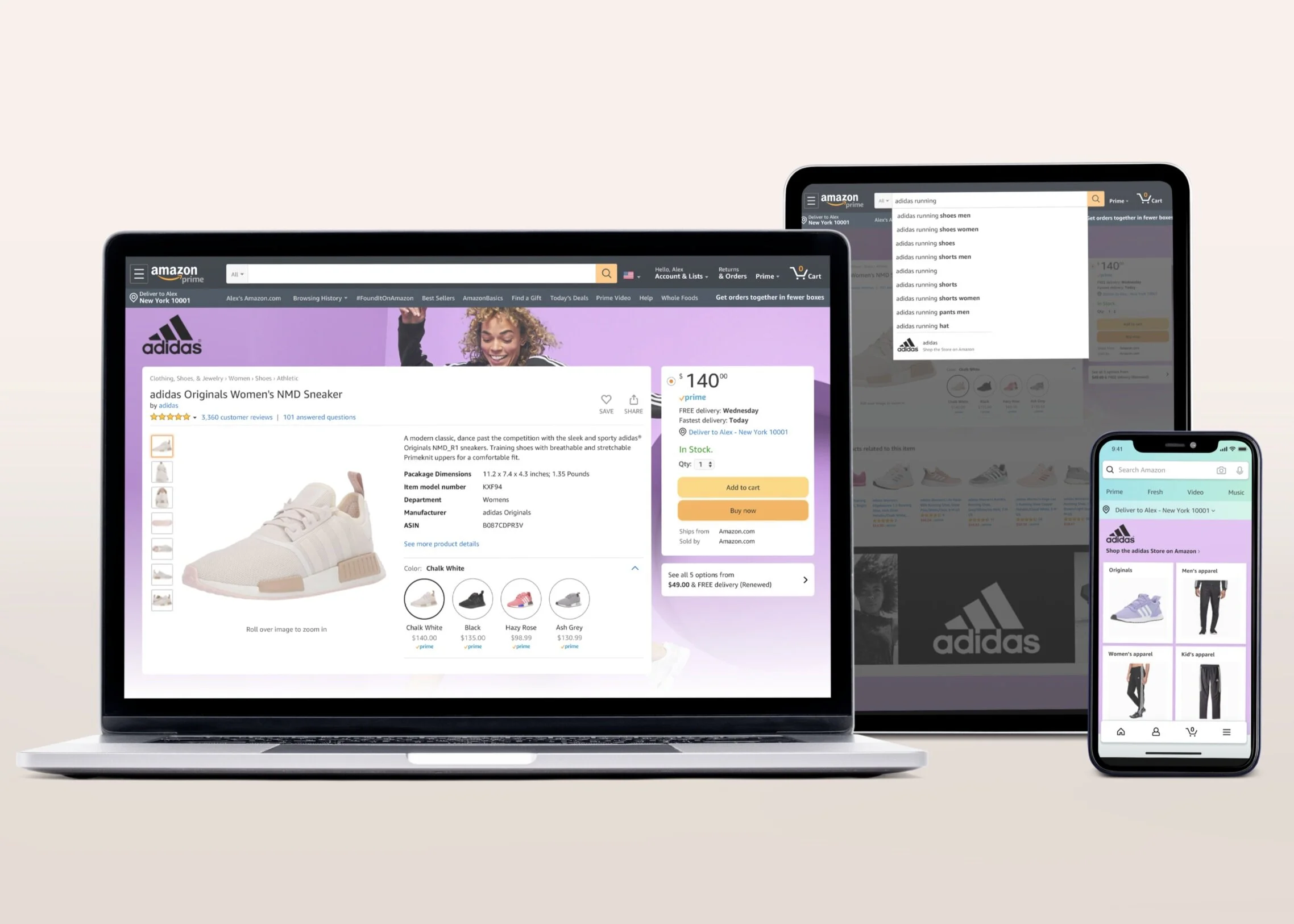
These traffic components are available on all devices–desktop, mobile, and app. Brand Skin pictured in desktop (laptop), Inline Search Autocomplete pictured on tablet (iPad), and Store Window on mobile (iPhone).
Kick Off
When hired, my role (as one of two Amazon Stores’ designers) was to focus on organic traffic. Many shoppers on Amazon are pretty utilitarian, challenging us to create a naturally integrated UX.
The task was to design ingress points and features that were relevant. This meant whether it be a search term submitted or browse action taken, we were looking for any interest of exploration.
The created components would ideally allow a shopper to better find what they were looking for, or didn’t know–bettering the overall experience.
Overview
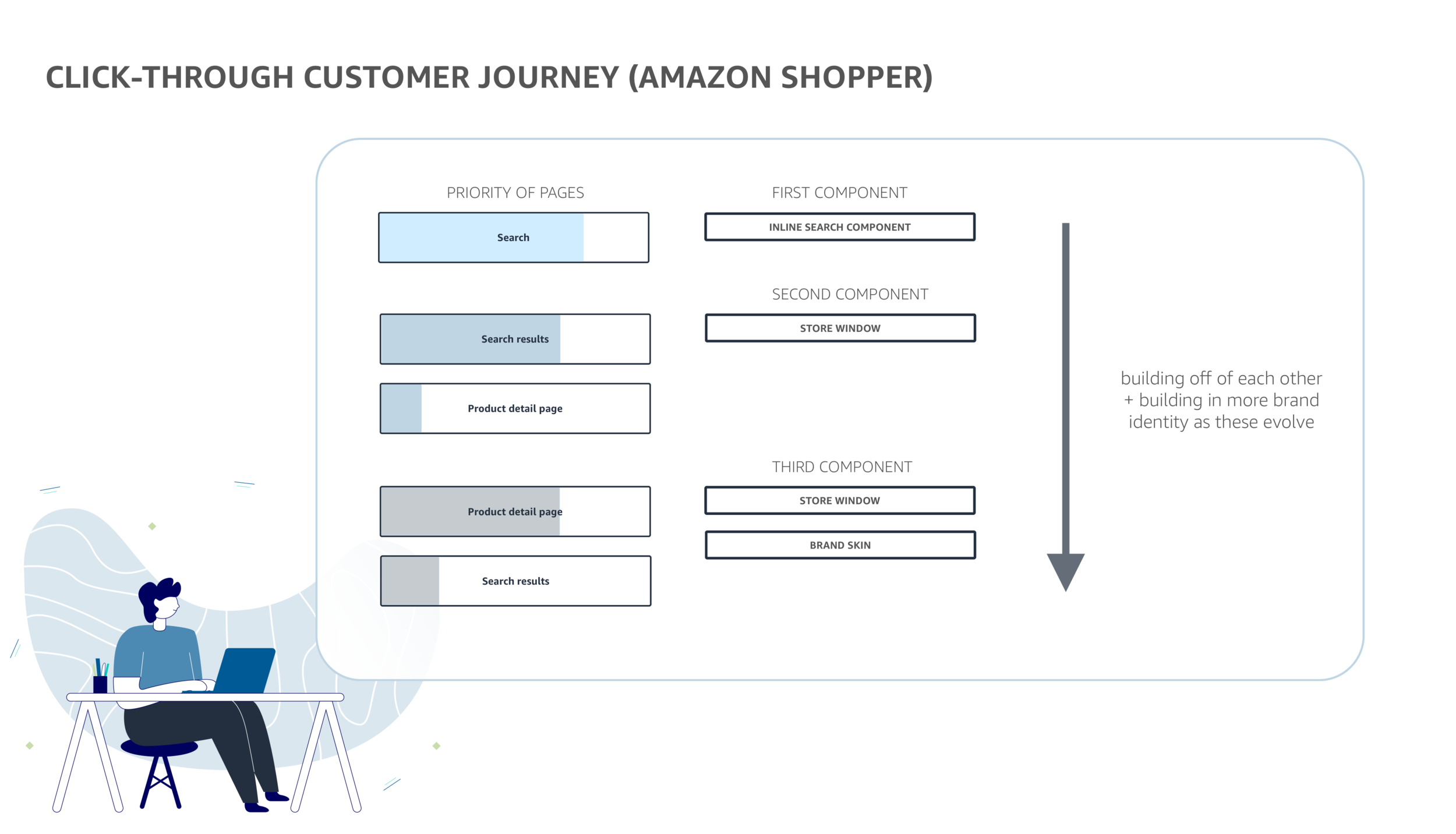
I joined forces with my product team (1 product manager + 2 engineers) to create a prioritization of launching and configuring Amazon Stores traffic pieces into the greater ecosystem. The thought process with phasing each motion was to slowly bring in more brand identity–through positioning and size of real estate, we would organically build out the presence of brand shopping.
At a high level, the main focal points of this traffic push were:
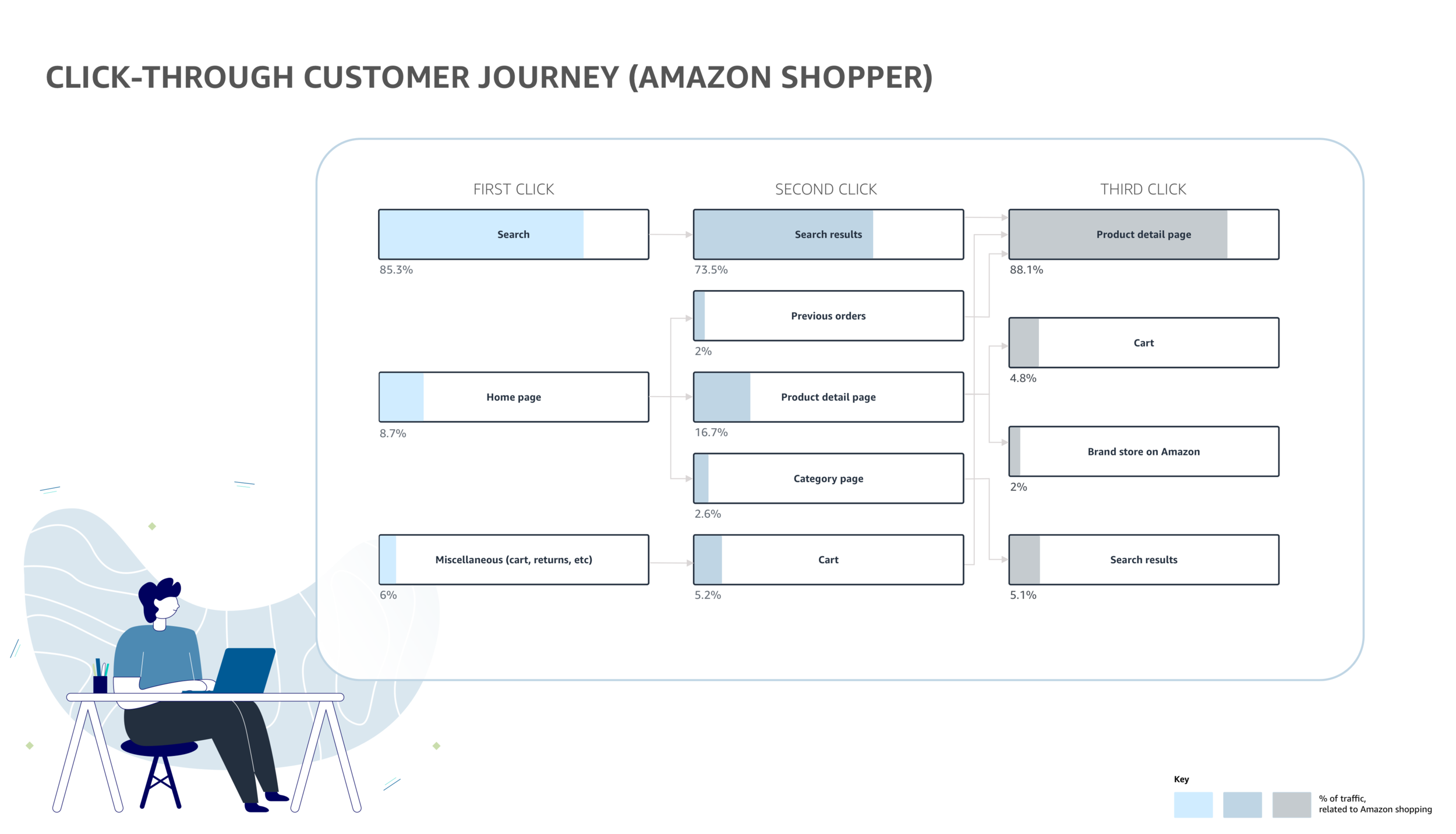
Inline Search Autocomplete - With over 85% of shoppers beginning their journey on Amazon inside of search, our first effort was to create an inline search ingress point that would lead a shopper to a relevant brand Store
Store Window - Moving away from dynamic ingresses, our second addition was to curate the bottom of relevant search pages + product detail pages with a branded card, mimicking what looking into a “Store window” would be like
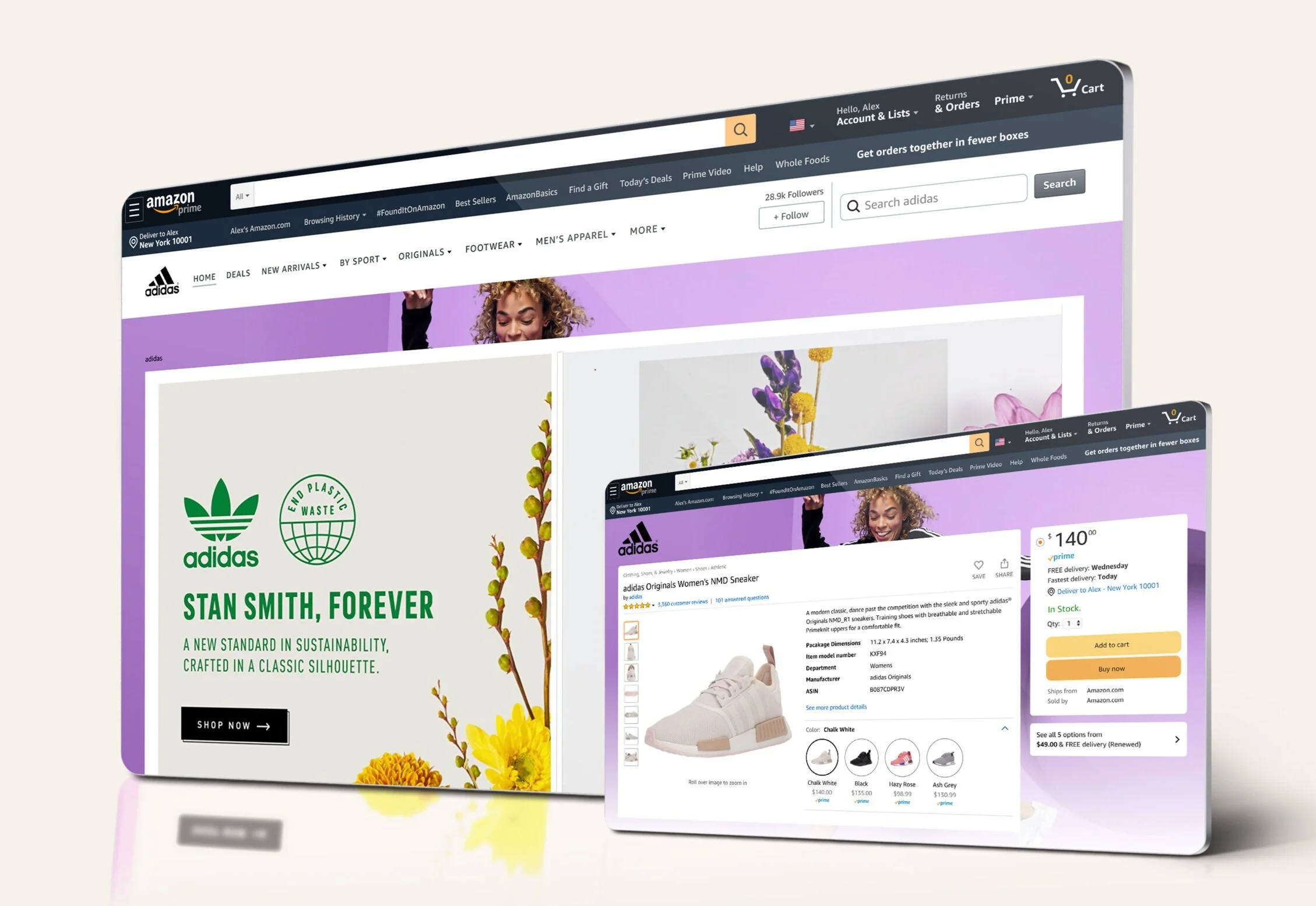
Brand Skin - By leveraging more high impact visuals, this ingress point expanded the full look and feel of the brand beyond Store. On select product detail pages, advertisers could showcase their Brand Skin to bring more life to the story the selling brand was trying to tell
Inline Search Autocomplete
Bringing in brands to search
Search was our primary place to bring awareness of Amazon Stores in front of shoppers. As seen in the above chart, a large percentage of shoppers come straight to type in their desired product when entering the Amazon ecosystem.
Using machine learning and shopping history, we configured a visual + appropriate string solution to bring Amazon Stores into search autocomplete.
For V1, if a shopper were to search: adidas running, our solution would return the adidas brand store on Amazon as a result.
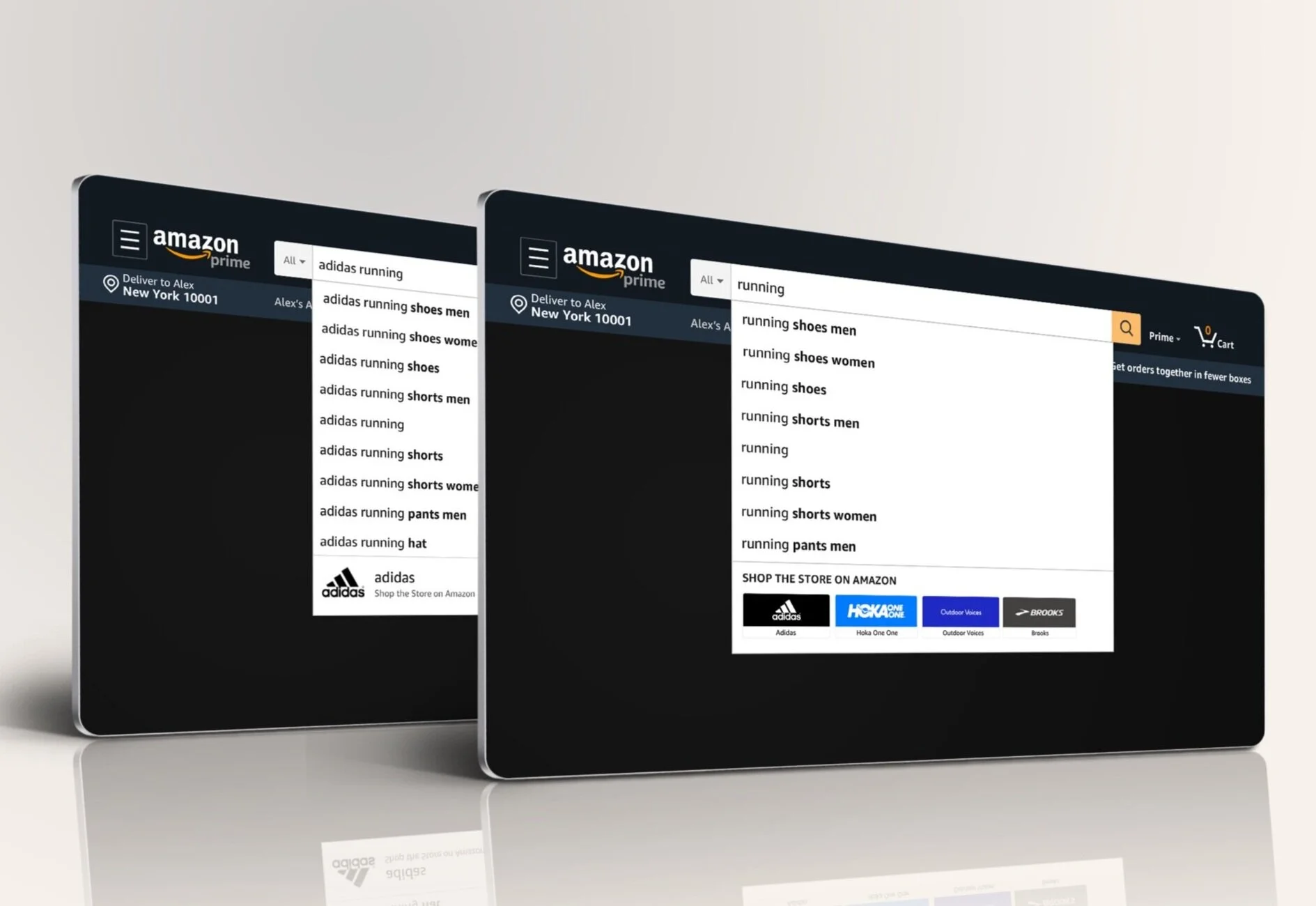
Results: We successfully surpassed our CTR goal of 13%, with a 34% CTR in our test. Our V2 iteration will return multiple applicable brands (branded search terms or not)

Store Window
Let’s look further into this brand
After a shopper uses the search bar, they most likely are exploring a specific product or deciding between a few. The whole notion of organic traffic was to pull in a shopper to a Brand Store, naturally.
By bringing Stores content to the search results and product detail pages, this component would pull in a natural interest from a shopper to a brand.
We curated the Store Window component with 2 visual options to showcase a brand’s identity throughout the shopping experience. If you are looking for a product in a physical store, it’s normal to see other products around or through the window…so in the same way, Amazon shoppers will get to peep what is available from a related brand at a high level.
Results: The Store Window is currently in beta–successfully performing toward it’s goal of reaching 11% (or more) Search results page shoppers + ~26% Product page shoppers
Brand Skin
Enhancing the brand shopping experience
Following the success of the above projects, we wanted to launch a premium branded shopping experience to enable advertisers to brand more of their detail pages, to drive more authenticity and signposting, helping shoppers connect with these brands.
The Brand Skin only is available to the brand associated with the product shown on the detail page. Clicking into it, leads to the Brand Store, and the future state of this will also exist seasonally, as brands desire.
See Brand Skin page for more details on this work.